Your revenue,
in the notch.
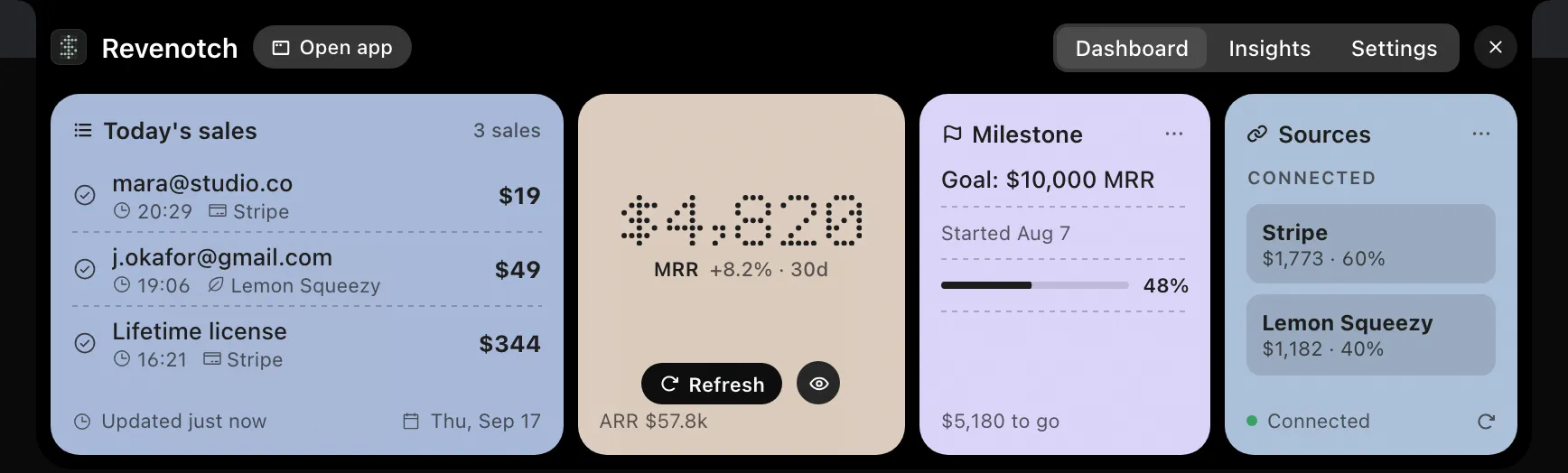
MRR for your SaaS, paid revenue for your shops and every new payment from Stripe, Lemon Squeezy, Dodo, Paddle and Polar, beside your Mac's notch and, on iPhone, in the Dynamic Island. One glance, without switching windows.

Less checking.
More making.
Every sale, the moment it lands.Pro
Revenotch checks your providers every minute. A payment it has not seen before shows its amount in the bar, in dot-matrix digits with a soft glow, and can play a sound. Old payments never flash twice.
MRR without opening a tab.
Hover the notch for today's sales, MRR and ARR, your milestone and every connected source. SaaS and shops never mix: SaaS shows MRR and what was paid in 30 days, shops show paid revenue only. Five providers, each with the narrowest key it allows, kept in your Keychain.
- $19mara@example.com20:29Stripe
- $49jo@example.org19:06Lemon Squeezy
- $344Lifetime license16:21Stripe
- Stripe$1,773 · 60%
- Lemon Squeezy$1,182 · 40%
See the week you had.
Seven days of revenue or sales as bars, the day you pick summed beside them, and your best day called out. Today, this week, the last seven days, or any date from the calendar.
11
12
13
14
15
16
17
Set it once, in the same place.
Which figure the bar shows, which display it lives on, whether SaaS, shops or both appear, how often payments and MRR refresh, the currency everything is shown in, privacy mode, launch at login. Six small cards, no preferences window to hunt for.
Converted with ECB rates, refreshed daily.
Shows ••• instead of money everywhere.
Unlimited sources, Insights, animations, milestones and privacy mode.
Revenotch 1.1.2
Add a source in a minute.
Open app takes you to Sources. Paste a key: Revenotch recognises the provider from its prefix, tests it against the API and stores it in your Keychain only when it works. The required permissions are listed right there.
- Sources
- Milestones
- General
- Pro
- About
- EditStripeStripe · added Jul 19, 2026
- EditLemon SqueezyLemon Squeezy · added Aug 18, 2026
- EditStripe · Northwindadded just now
Paste a key and Revenotch picks the provider from its prefix and tests it right away.
Dashboard → Developers → API keys → Create restricted key. Leave every other resource on None.
What a maker checks ten times a day.
Most of them move on hover.
Your revenue, in your pocket.
The same black dashboard on your iPhone, with widgets and the Dynamic Island. Nothing to sign in to: paste the key you already have.
- Dynamic IslandTurn it on in Settings and MRR, today's revenue or the last sale sits up top; a new sale lights it up with the amount.
- Widgets and the lock screenSmall, medium and lock-screen widgets, stamped with the last refresh.
- Same keys, same figuresThe same five providers with the same keys, as narrow as each provider allows, kept in the iPhone's Keychain.
- One purchasePro is a universal purchase: buy it on the Mac or the iPhone, it unlocks on both.
- $19mara@example.com
- $49jo@example.org
- $344Lifetime license
- StripeMRR $1,773 · 60%
- Lemon SqueezyMRR $1,182 · 40%
Works with what indie makers use.
Exactly what each source reads, and what its key needs.
Stripe
Charges and subscriptions.- MRR
- Daily revenue
- Payments
- Test mode
Restricted key, read-onlyHow the key is madeLemon Squeezy
Orders and subscriptions.- MRR
- Daily revenue
- Payments
- Test mode
API key (no scopes)How the key is madeDodo Payments
Payments and subscriptions.- MRR
- Daily revenue
- Payments
- Test mode
API key, write access offHow the key is madePaddle
Transactions and subscriptions.- MRR
- Daily revenue
- Payments
- Sandbox
API key, three read scopesHow the key is made- Orders and subscriptions.
- MRR
- Daily revenue
- Payments
- Sandbox
Access token, read scopesHow the key is made
Free to try. Pro is one purchase.
The free tier is the notch bar, the Dashboard tab, one source and the Demo. Pro unlocks the rest, once, on every Mac and iPhone signed in with your Apple Account.
$9.90USD · one-time
- Unlimited sources
- Insights tab
- Sale animation, sound and haptics
- Milestones
- Privacy mode
- Mac and iPhone, one purchase
A few things worth knowing.
Compatibility, privacy, and what comes with Pro.
What is the notch?
Does it work without a notch?
How often does it refresh?
What does the Demo show?
Which providers are supported?
Is my API key safe?
What does "read-only" mean for each provider?
Does it invent numbers?
Which macOS versions does it need?
Is there an iPhone app?
Does it use Accessibility permissions?
How is Pro sold?
Do I pay for Pro twice for the Mac and the iPhone?
Keep your revenue in sight.
Your numbers beside the notch and in the Island, your keys in your Keychain, and nothing in between.